Pending to Rent List
The Pending to Rent List shows the COP cases. Use it to record whether each property is waiting to be rented or has been rented.
To open it: in the left menu, click Case Management > Pending to Rent List.
You only see this page if your role can update rental status. The list only shows cases you can see. See Which cases you see.
Permissions
Set in Role & Permission:
| Item | Permission |
|---|---|
| Pending to Rent List menu and page | Cases > Update rental status |
| Cases in the list, View | Cases > View (Cases > View all to see every case) |
| Mark as Pending to Rent, Mark as Rented | Cases > Update rental status |
Without Cases > View, the list is empty.
You can set the rental status of a COP case at any case status.
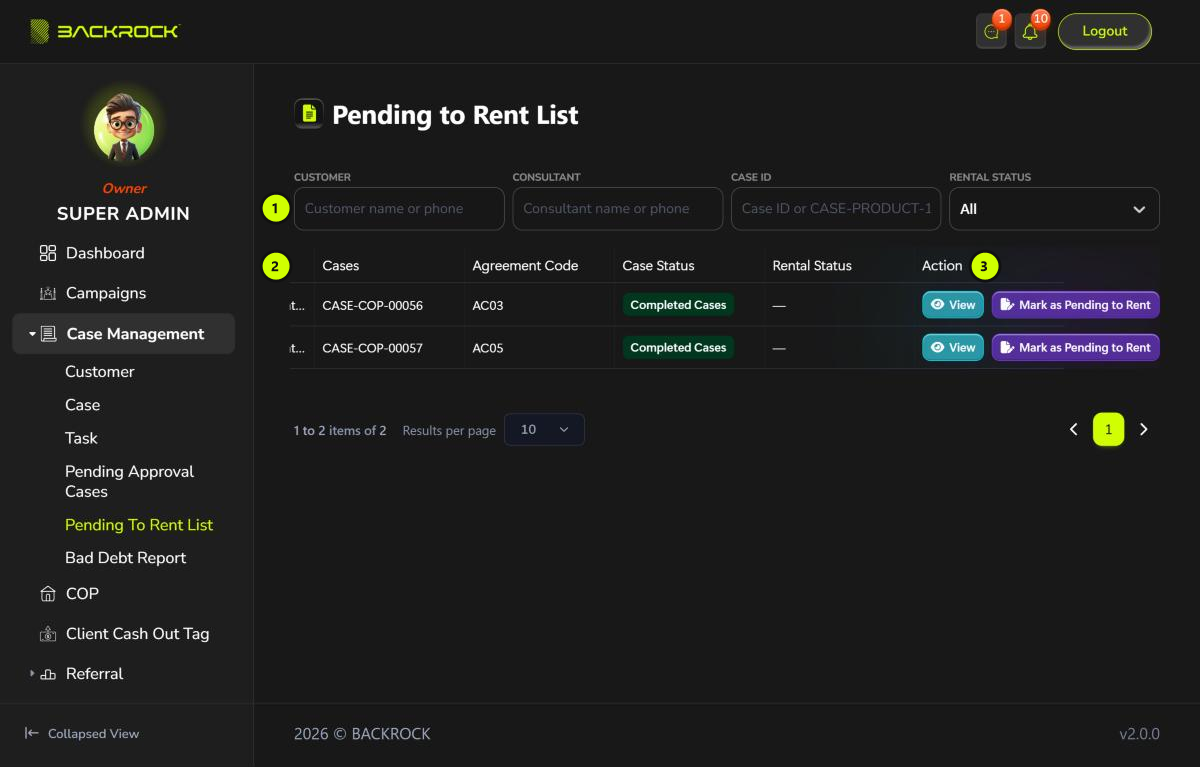
1. Filters
| Filter | How to use it |
|---|---|
| Customer | Type the customer's name or phone number |
| Case ID | Type the case number, for example CASE-COP-00056, or just the number 56 |
| Rental Status | Choose All, Pending to Rent or Rented |
The list updates when you stop typing.
2. Case table
| Column | What it shows |
|---|---|
| Customer | The customer's name and phone number |
| Handle By | The person handling the case |
| Cases | The case number |
| Agreement Code | The agreement code of the case |
| Case Status | The current status of the case |
| Rental Status | — if not set yet, Pending to Rent or Rented |
The table is wider than the page. Scroll it to the right to see Rental Status and Action.
Use Results per page to show more. The number counts customers, so a page shows all the COP cases of those customers.
3. Action
- View: opens the Case Details.
- The rental button moves the case to its next rental status. Click it, then click Yes to confirm.
| Rental Status now | Button | Rental Status after | Message |
|---|---|---|---|
| — (not set) | Mark as Pending to Rent | Pending to Rent | Case marked as pending to rent successfully |
| Pending to Rent | Mark as Rented | Rented | Case marked as rented successfully |
| Rented | No button |
If the change can't be saved, you see an error message instead.
The new rental status also shows in the Rental Status column of the Case List.