Referral Code
Use this page to invite new agents. A new agent who registers with your link, code or QR code becomes your direct downline.
To open it: in the left menu, click Referral > Referral Code.
Permissions
Set in Role & Permission:
| Item | Permission |
|---|---|
| Referral Code menu and page | Referrals > View referral code |
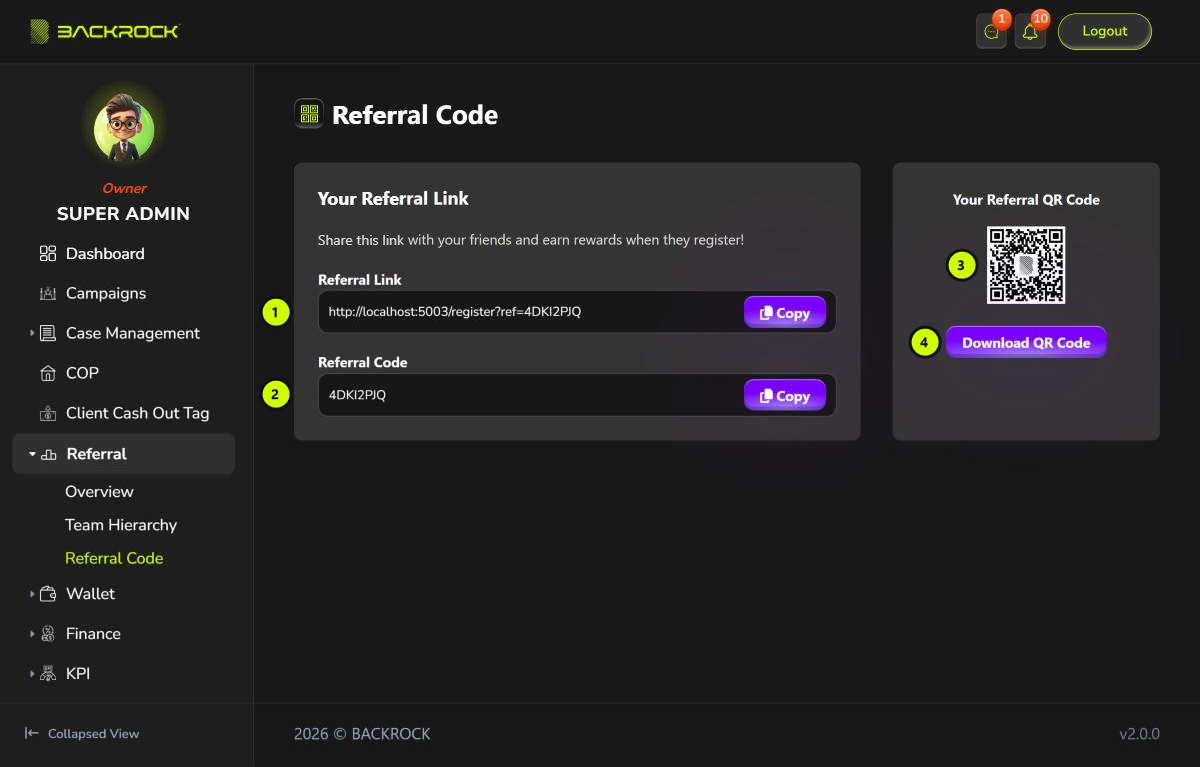
1. Referral Link
Your own registration link. It opens the Create New Account page of the Admin Portal with your referral code already filled in.
Click Copy to copy the link. You see Link copied to clipboard. Send the link to the person you want to invite.
2. Referral Code
Your referral code. Click Copy to copy it. You see Code copied to clipboard.
The person can also open the Create New Account page themselves and type your code in Referral Code.
3. Your Referral QR Code
A QR code of your referral link. The person can scan it with their phone to open the registration page.
4. Download QR Code
Saves the QR code to your computer as a PNG image, for example to print it or send it as a picture.
What happens when someone registers
- The person opens your link, or scans your QR code.
- On Create New Account, they fill in their full name as per IC, phone number, the verification code sent to their phone, a password (at least 6 characters) and their gender, then click Register.
- They become an agent in your team, as your direct downline. They start at the first agent rank.
You can then see them on the Referral Overview and in Team Hierarchy.