Commission Report
When a case is fully paid, the system works out the commissions for the case: one line for each person and each bonus. The Commission Report lists these lines for all cases, with their approval and payment status. The lines are approved on the Approval page, in the Case Commission tab.
COP commissions and IMS commissions are not in this report.
To open it: in the left menu, click Report > Commission Report.
Permissions
Set in Role & Permission:
| Item | Permission |
|---|---|
| Commission Report menu, list and Export | Reports > View case commission report |
| Open a case from Case ID | Cases > View |
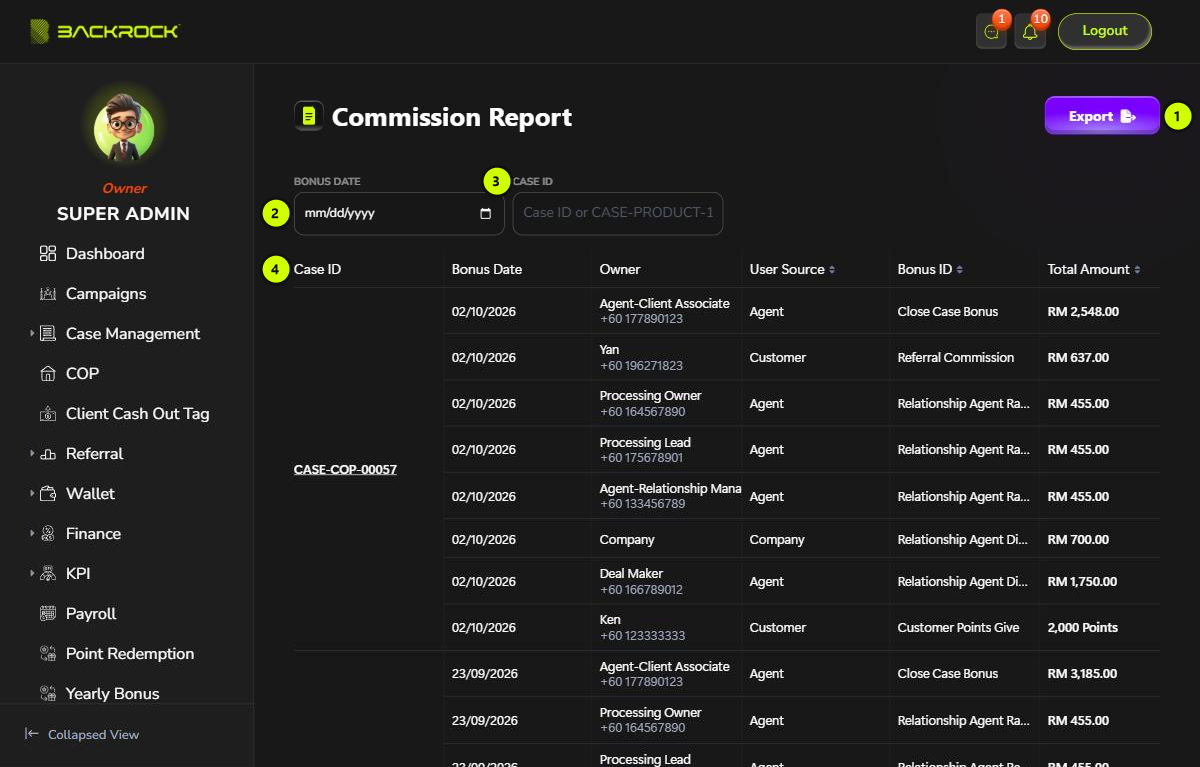
1. Export
Downloads the commission lines as a CSV file that you can open in Excel. The current filters are applied. The file has the same columns as the table: Case ID, Bonus Date, Owner, User Source, Bonus ID, Total Amount, Wallet, Remark, Approval Status and Status.
2. Bonus Date
Choose a date to show only the commissions worked out on that day. Click × to clear it.
3. Case ID
Type a case number to show only that case, for example 57 or CASE-COP-00057. Click × to clear it.
4. Commission table
The lines are grouped by case. The newest cases are shown first. Case ID is shown once for all the lines of the case. Click it to open the case details. If your role can't view cases, it is shown as plain text.
| Column | What it shows |
|---|---|
| Case ID | The case |
| Bonus Date | When the commission was worked out |
| Owner | Who gets it, with their phone number, or Company for the part the company keeps |
| User Source | Agent, Customer or Company |
| Bonus ID | The kind of bonus, for example Close Case Bonus, Referral Commission or Customer Points Give |
| Total Amount | The amount in RM. For Customer Points Give, it shows the points |
Results per page counts cases, not lines. A page of 10 can show more than 10 lines.
Wallet and status
The table is wider than the page. Scroll it to the right to see the rest.
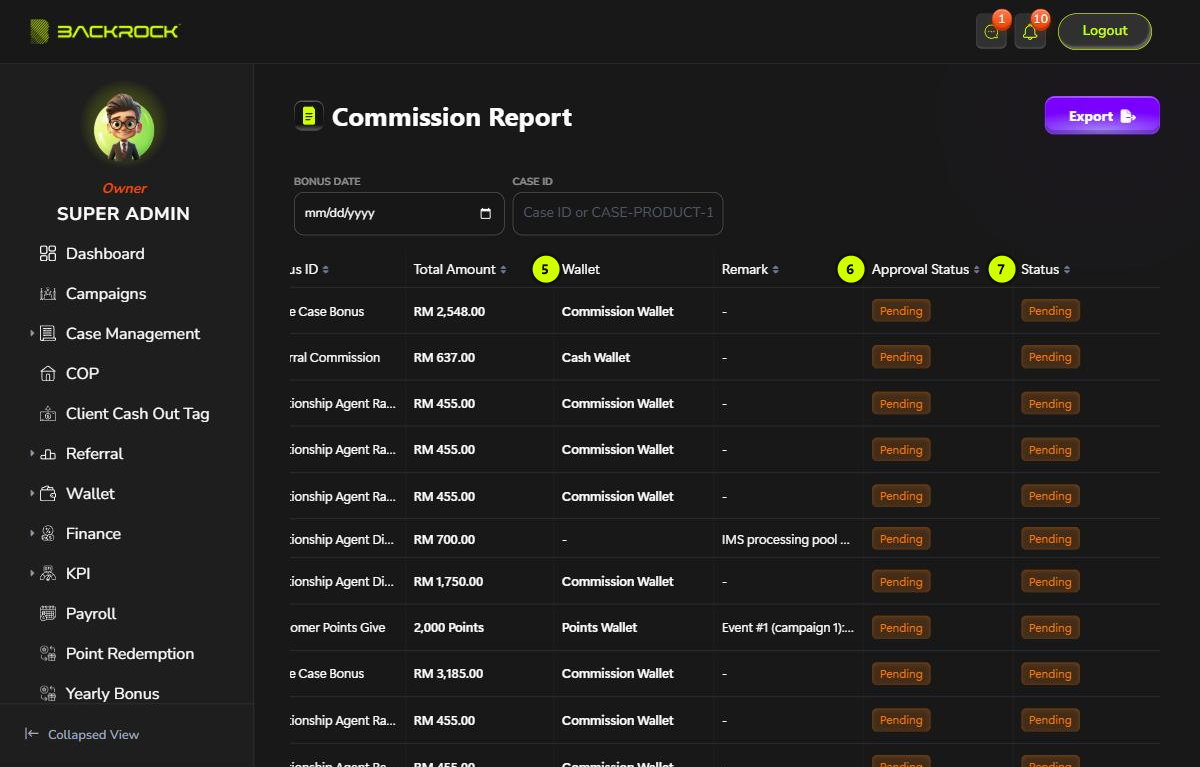
5. Wallet and Remark
- Wallet: the wallet the commission is paid into: the Commission Wallet for agents, the Cash Wallet for a customer's referral commission, or the Points Wallet for points. Company lines show -.
- Remark: a note on the line, for example the event that gave the points, or that the amount goes to the IMS pool (see IMS Pool Report).
6. Approval Status
| Approval Status | What it means |
|---|---|
| Pending | Waiting for approval |
| Approved | All approval layers have approved it |
| Rejected | Rejected. Nobody is paid and the amount stays with the company |
7. Status
| Status | What it means |
|---|---|
| Pending | Not paid yet |
| Distributed | Paid into the owner's wallet. For Company lines, it means the amount has been kept by the company |
| Inactive | The line was rejected |
Click Bonus ID, Total Amount or Status to sort. The other columns can't be sorted.