Wallet Balance
Wallet Balance lists the balance of every wallet in the system, for both agents and customers.
To open it: in the left menu, click Report > Wallet Balance.
Permissions
Set in Role & Permission:
| Item | Permission |
|---|---|
| Wallet Balance menu, list and Export | Reports > View wallet balance report |
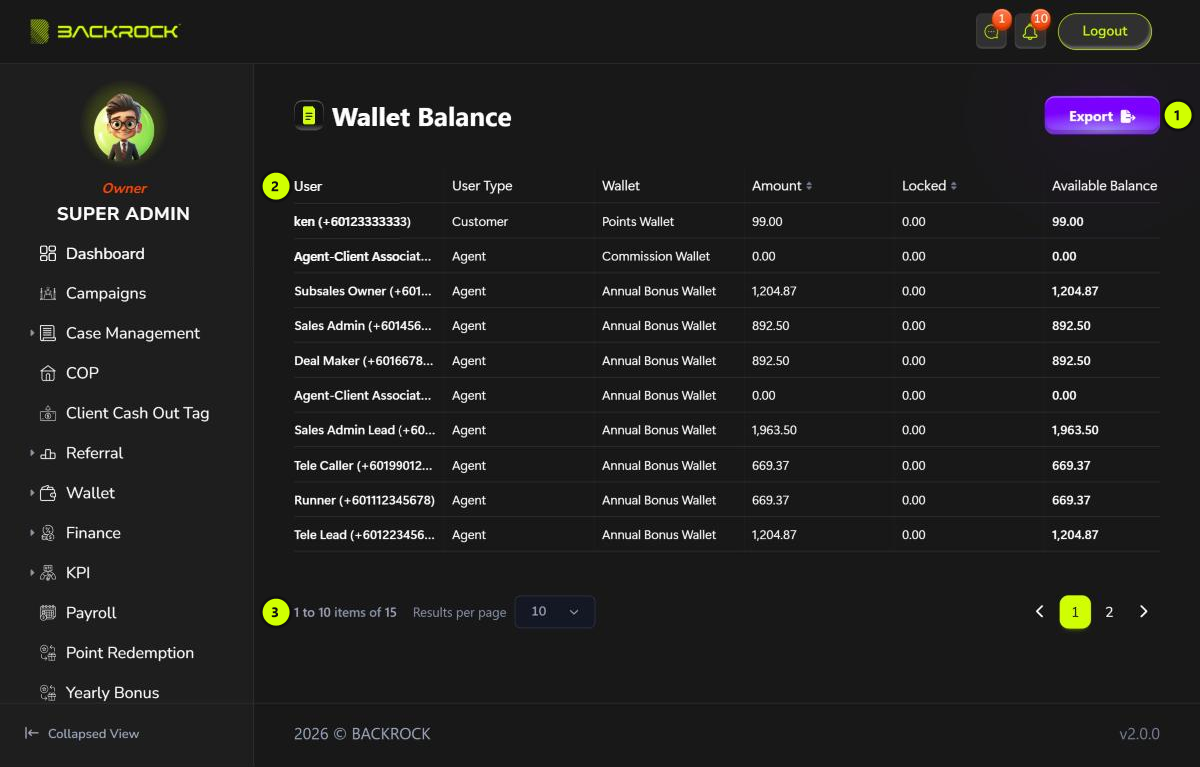
1. Export
Downloads all the balances as a CSV file that you can open in Excel. The file has the same columns as the table.
2. Balance table
One row for each wallet of each person.
| Column | What it shows |
|---|---|
| User | The person's name and phone number |
| User Type | Agent or Customer |
| Wallet | The wallet. See the table below |
| Amount | The total in the wallet |
| Locked | The part that is on hold and can't be used yet, for example while a bad debt is being checked |
| Available Balance | Amount − Locked |
Click Amount or Locked to sort by that column.
| Wallet | Who has it | What it holds |
|---|---|---|
| Commission Wallet | Agents | Commissions that have been approved and paid out |
| Annual Bonus Wallet | Agents | The yearly bonus. See Yearly Bonus |
| Cash Wallet | Customers | Money the customer can withdraw, such as referral commission |
| Points Wallet | Customers | Points the customer can use for Point Redemption or the lucky spin |
3. Pages
Use Results per page and the page numbers to move between pages.