Customer Campaign
Customer campaigns give customers extra points in their Points Wallet for a period. There are two types:
| Campaign Type | What the customer gets |
|---|---|
| Multiplier | When a customer's case is fully paid during the campaign, and the case's amount is at least the Target Value, the customer's case points are increased. The points show in the Commission Report with a remark such as "Event #1 (campaign 1): 1000 x 2" |
| Referral bonus | When a customer has referred the Target Value number of new customers during the campaign, they get the Distribute Amount in points, once. They also get a notification |
Only one active campaign of each type can run at the same time.
To open it: in the left menu, click Setting > Customer Campaign.
Permissions
Set in Role & Permission:
| Item | Permission |
|---|---|
| Customer Campaign menu, list and View | Customer Campaigns > View |
| Create Customer Campaign | Customer Campaigns > Create |
| Edit | Customer Campaigns > Edit |
Customer Campaign list
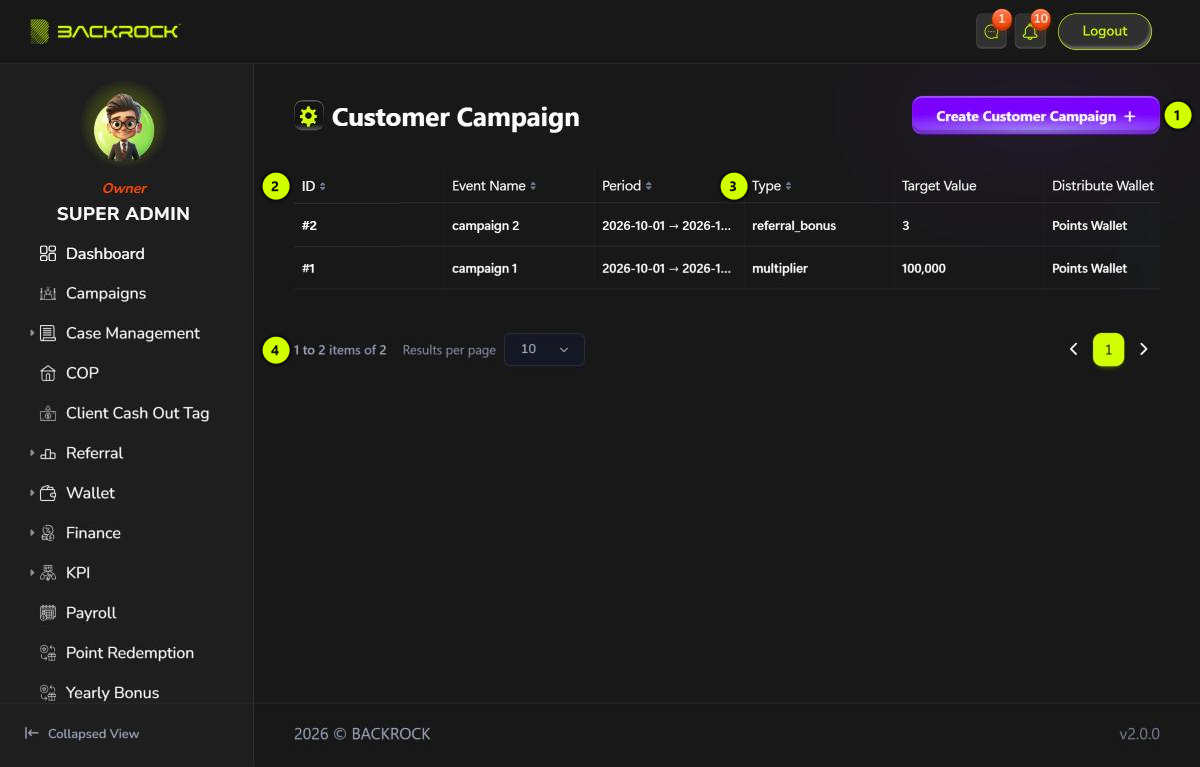
- Create Customer Campaign: opens the form to add a campaign. You only see it if your role can create customer campaigns.
- Campaign table: the newest campaigns first, with the ID, Event Name and Period.
- Type, Target Value and Distribute Wallet: the campaign type (
multiplierorreferral_bonus), its target and the wallet the points go to. Scroll the table to the right to see the Action column:- View: shows the campaign and every customer who has received points from it (Event Records).
- Edit: opens the campaign to change it. You need permission to edit customer campaigns.
- Pages: use Results per page and the page numbers to move between pages.
A customer campaign can't be deleted. To stop it, edit it and set Status to Inactive.
Create a customer campaign
Click Create Customer Campaign.
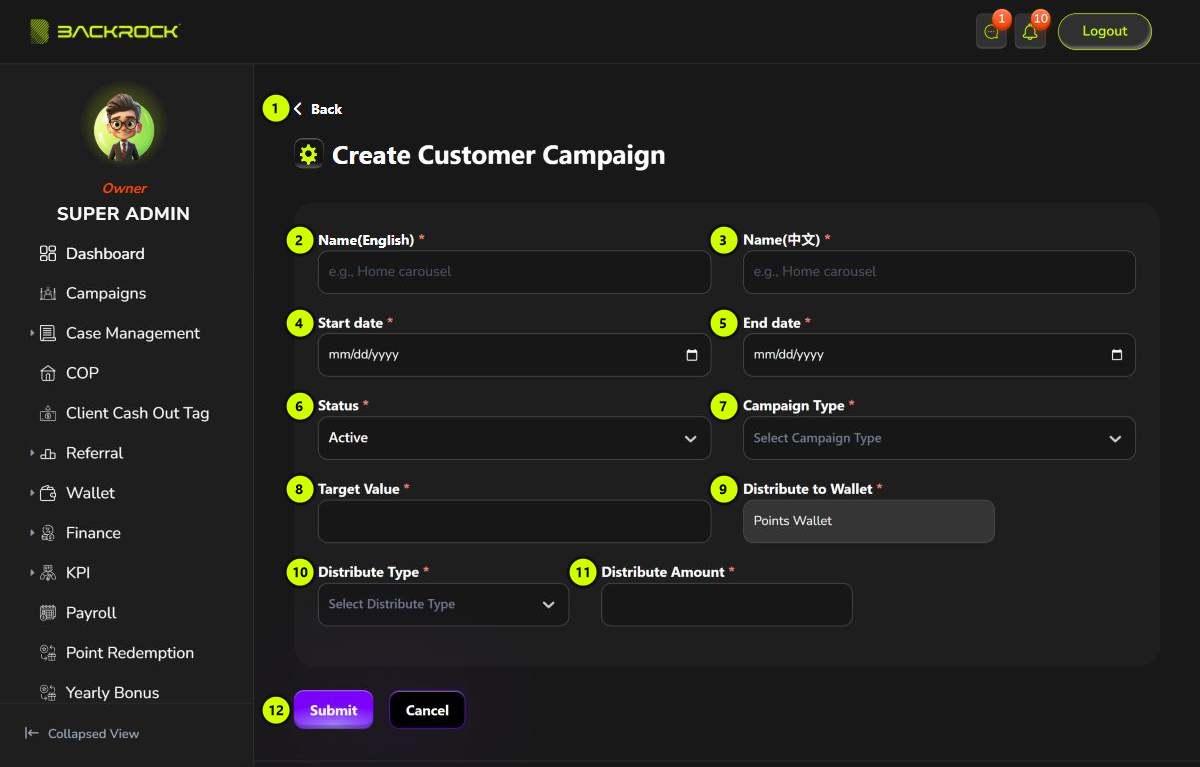
- Back: returns to the list without saving.
- Name(English) (required).
- Name(中文) (required).
- Start date (required).
- End date (required): can't be before the start date.
- Status (required): Active or Inactive. Only active campaigns give points.
- Campaign Type (required): Multiplier or Referral bonus.
- Target Value (required): for Multiplier, the lowest case amount in RM; for Referral bonus, the number of referrals.
- Distribute to Wallet: always the Points Wallet.
- Distribute Type (required):
- Multiplier: the case points are multiplied by the amount. For example, an amount of 2 doubles the points.
- Fix: the amount is added to the case points, or given as the referral bonus.
- A Referral bonus campaign always uses Fix.
- Distribute Amount (required): the multiplier or the number of points.
- Submit: saves the campaign. You see Event created successfully and return to the list. Click Cancel to leave without saving.
If another active campaign of the same type overlaps the dates, you see Event with type "…" already exists in this period. Change the dates, or set one campaign to Inactive.
Edit a customer campaign
Click Edit on a row, change the fields, then click Update. You see Event updated successfully. The change applies from then on. Points already given don't change, and a referral bonus is never given twice.
A Multiplier campaign is matched on the day the case becomes fully paid, not the day the case was created. A case that is fully paid after the end date doesn't get the extra points.