Points & Rewards
Customers earn points in their Points Wallet when their case is fully paid. This page sets how many points they earn. The points are given as the Customer Points Give bonus (see Commission), and can be increased by a Customer Campaign.
To open it: in the left menu, click Setting > Points & Rewards. The page heading is Points & Rewards Settings.
Permissions
Set in Role & Permission:
| Item | Permission |
|---|---|
| Points & Rewards menu, page and Update | Point & Rewards > View |
Anyone who can open this page can also change the Earning Rate. There is no separate permission for changing it.
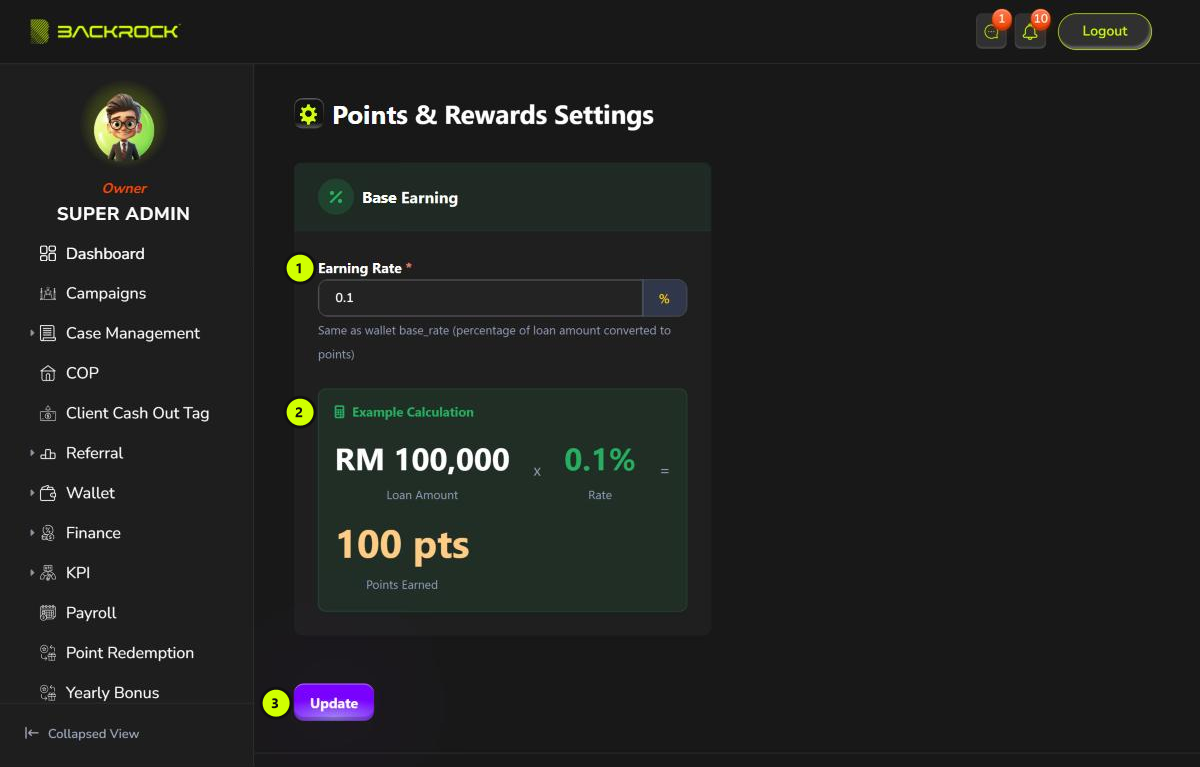
1. Earning Rate
The percentage of the case amount that is given as points. For example, at 0.1%, a case of RM 100,000 gives 100 points. Points are whole numbers; any fraction is dropped.
2. Example Calculation
Shows how many points a case of RM 100,000 gives at the rate you typed.
3. Update
Saves the rate. You see Wallet updated successfully. The new rate applies to cases that become fully paid after the change. Points already given don't change.
If the Earning Rate is empty or 0, customers don't earn any points. Check the rate before you click Update.