Withdrawal
Customers can withdraw money from their Cash Wallet in the Member Portal (see Withdraw in the Member Portal guide). This page shows the rules for those withdrawals. The requests are handled on the Withdraw Request page.
To open it: in the left menu, click Setting > Withdrawal. The page heading is Withdrawal Setting.
Permissions
Set in Role & Permission:
| Item | Permission |
|---|---|
| Withdrawal menu and page | Withdrawal > View (the same permission as Withdraw Request) |
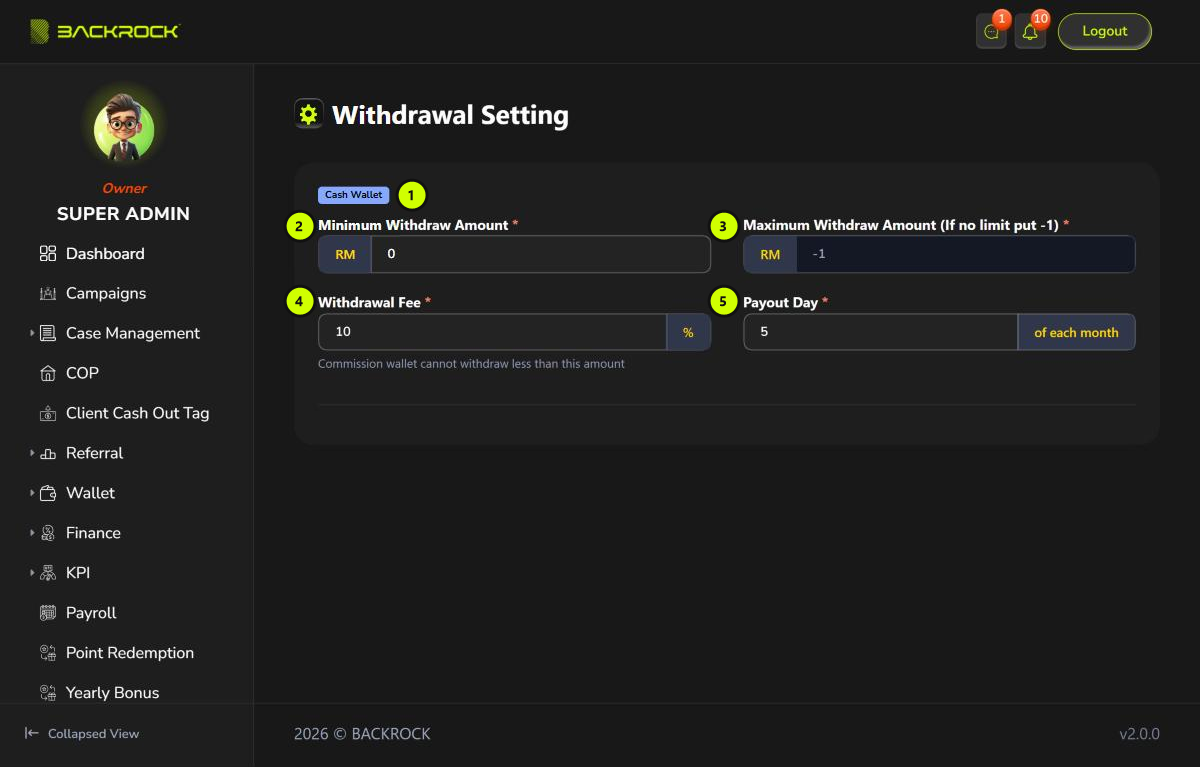
1. Wallet
The wallet the rules apply to: Cash Wallet.
2. Minimum Withdraw Amount
The lowest amount a customer can withdraw, in RM.
3. Maximum Withdraw Amount
The highest amount a customer can withdraw at a time, in RM. -1 means there is no limit.
4. Withdrawal Fee
The fee taken from each withdrawal. For example, at 10%, a customer who withdraws RM 100 receives RM 90.
5. Payout Day
The day of the month withdrawals are paid out. When a request is approved before this day, it is paid on this day of the same month; otherwise it is paid on this day of the next month.
This page is read-only: no role can change these settings here. Contact the system administrator to change them.
Changes and pending requests
- The minimum, maximum and fee are checked when the customer makes the request. A change doesn't affect requests already made.
- The payout day is read when a request is approved. A change applies to every request approved afterwards.