Case Details
The Case Details page shows the full information of one case. Everything on this page is view only. If something needs to change, contact your consultant.
To open it: on the Case List, click View on a case. You can also click View details on the Dashboard.
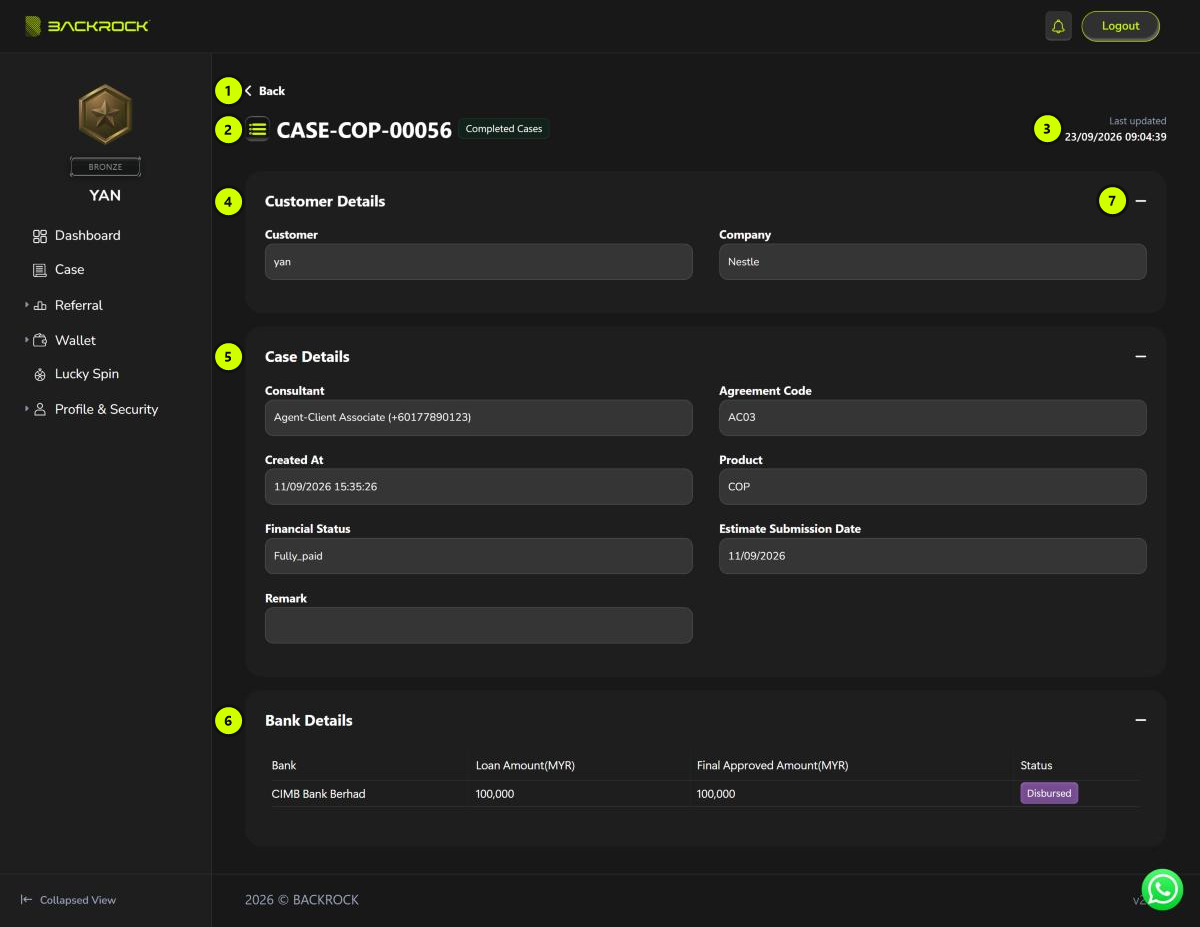
1. Back
Returns to the Case List.
2. Case number and status
The case number (for example CASE-COP-00056) and the current status of the case.
3. Last updated
When the case was last updated.
4. Customer Details
The customer name and company for this case.
5. Case Details
| Field | What it shows |
|---|---|
| Consultant | Your consultant's name and phone number |
| Agreement Code | The agreement code of the case |
| Created At | When the case was created |
| Product | The financing product |
| Financial Status | The repayment status of the case |
| Estimate Submission Date | The expected submission date |
| Remark | Any note on the case |
6. Bank Details
Each bank the case was sent to, with the Loan Amount, the Final Approved Amount (both in MYR) and that bank's Status.
7. Show or hide a section
Click − to hide a section and + to show it again. Customer Details and Case Details are open when the page loads. Bank Details is closed, so click + to see it.
Some cases also have a Cop Details section with the project code, size (sqft), property type, state and country. It is closed when the page loads. Click + to open it.