Dashboard Overview
The Dashboard is your home page in the Member Portal. It gives you a quick summary of your referrals, your rank, your wallets and your latest applications.
To open it: sign in to the Member Portal. You land on the Dashboard. From any other page, click Dashboard in the left menu.
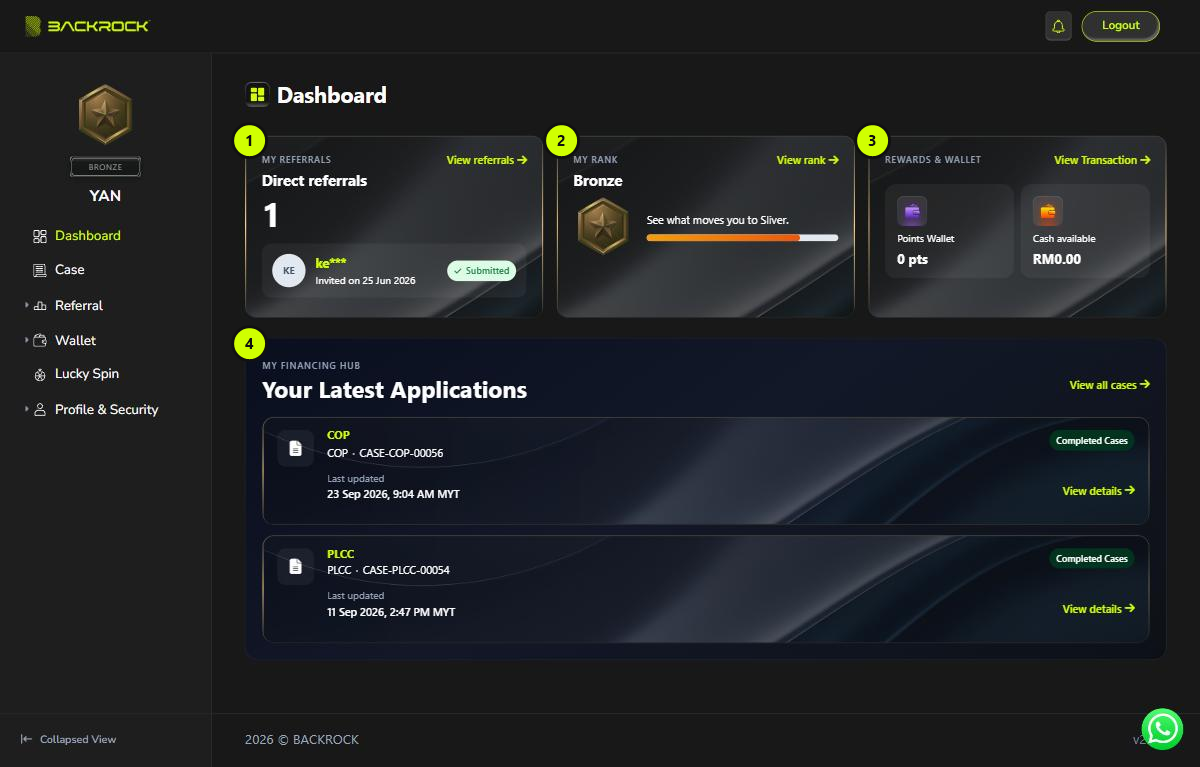
1. My Referrals
- The big number is how many people you have referred.
- Below it is the latest person you referred, with the date you invited them. Only the start of their name is shown.
- The status shows Submitted once that person has registered with your invitation. Until then, it shows Pending.
- If you have not referred anyone yet, you see No referrals yet.
- Click View referrals to open the Direct Referral page.
2. My Rank
- Shows your current rank and its medal.
- The bar shows how close you are to the next rank.
- Click View rank to open the Referral Overview page. That page shows every requirement for the next rank and your progress on each one.
info
You don't need to apply for a rank. The system updates your rank automatically when you meet the requirements. It may take a little while to show.
3. Rewards & Wallet
- Points Wallet: the points you can use now, shown as a whole number (for example
120 pts). - Cash available: the money in your Cash Wallet that you can use now, in RM.
- Click View Transaction to open Transaction History.
4. Your Latest Applications
- Shows your two most recently updated applications.
- Each one shows the product, the case number, the current status and when it was last updated.
- Click View details to open that application. See Case Details.
- Click View all cases to open the Case List.
- If you have no applications yet, this section is not shown.
tip
If something on the Dashboard looks out of date, refresh the page.