Login & Account Access
This page explains how to sign in to the Member Portal, what to do if you forget your password, and how to create your account with an invitation link.
Sign in
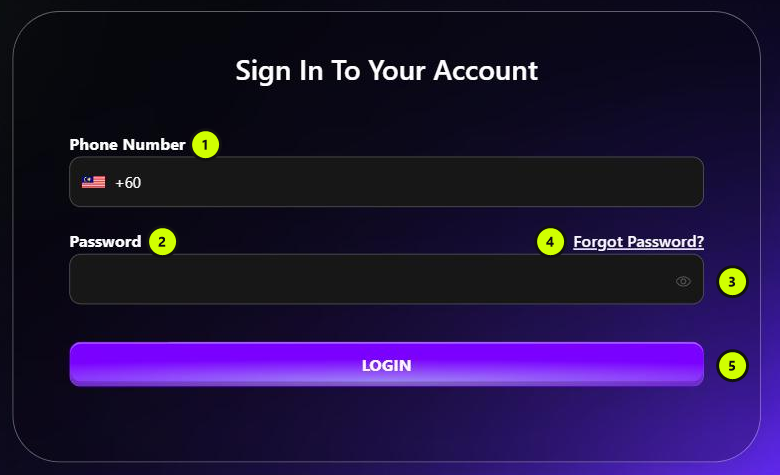
- Phone Number: enter your mobile number. The country code is +60 (Malaysia).
- Password: enter your login password.
- Click the eye icon to show or hide your password.
- Forgot Password?: opens the password reset page. See Forgot your password.
- LOGIN: signs you in. You land on the Dashboard.
You stay signed in for up to 30 days. After that, you need to sign in again.
If you can't sign in
| Message | What it means |
|---|---|
| Invalid credentials | The phone number or password is wrong. Check them and try again, or reset your password. |
| Your account is not activated yet. Please contact your agent to get the registration link. | You were invited but haven't registered yet. Ask for your invitation link and create your account. |
| Your account is inactive. Please contact support. | Your account has been turned off. Contact BackRock. |
Forgot your password
On the login page, click Forgot Password?.
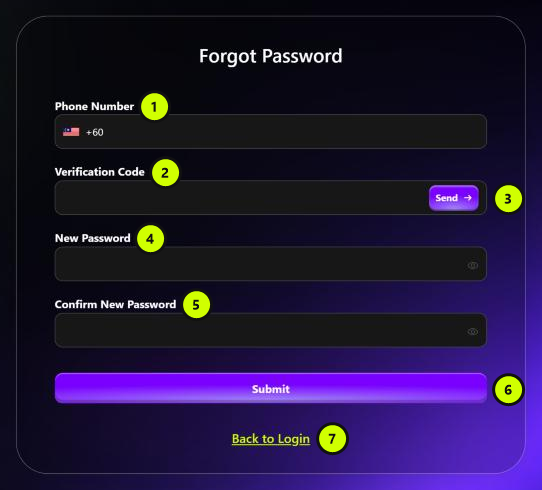
- Phone Number: enter the mobile number of your account.
- Verification Code: enter the code you receive.
- Send: sends a verification code to your phone number. You can ask for a new code after 60 seconds. The code is valid for 5 minutes.
- New Password: at least 6 characters.
- Confirm New Password: type the new password again.
- Submit: saves your new password and takes you back to the login page.
- Back to Login: returns to the login page without changing anything.
Create your account with an invitation link
You can only create a Member Portal account with an invitation link. You get the link from the member who referred you, or from your agent. (Members send invitations from Direct Referral.)
Open your invitation link. The Create New Account page opens.
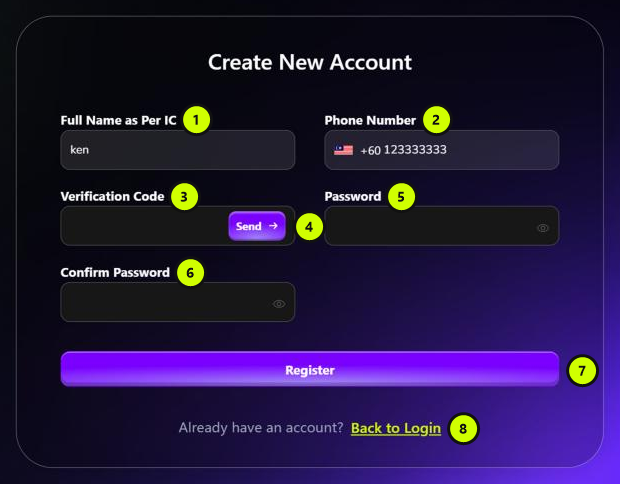
- Full Name as Per IC: filled in from your invitation. You can't change it.
- Phone Number: filled in from your invitation. You can't change it.
- Verification Code: enter the code you receive.
- Send: sends a verification code to your phone number. You can ask for a new code after 60 seconds. The code is valid for 5 minutes.
- Password: at least 6 characters.
- Confirm Password: type the password again.
- Register: creates your account. When it succeeds, you go to the login page. Sign in with your phone number and new password.
- Back to Login: returns to the login page without registering.
note
- An invitation link can only be used once.
- If the link is wrong, you see Invalid invitation code. If it has already been used, you see Invitation code already used. Either way, you go back to the login page.
Log out
Click Logout at the top-right of any page.