My KYC Form
The My KYC Form page (titled Profile) shows the details BackRock holds about you. The page is view only. If anything is missing or wrong, contact BackRock.
To open it: in the left menu, click Profile & Security > My KYC Form.
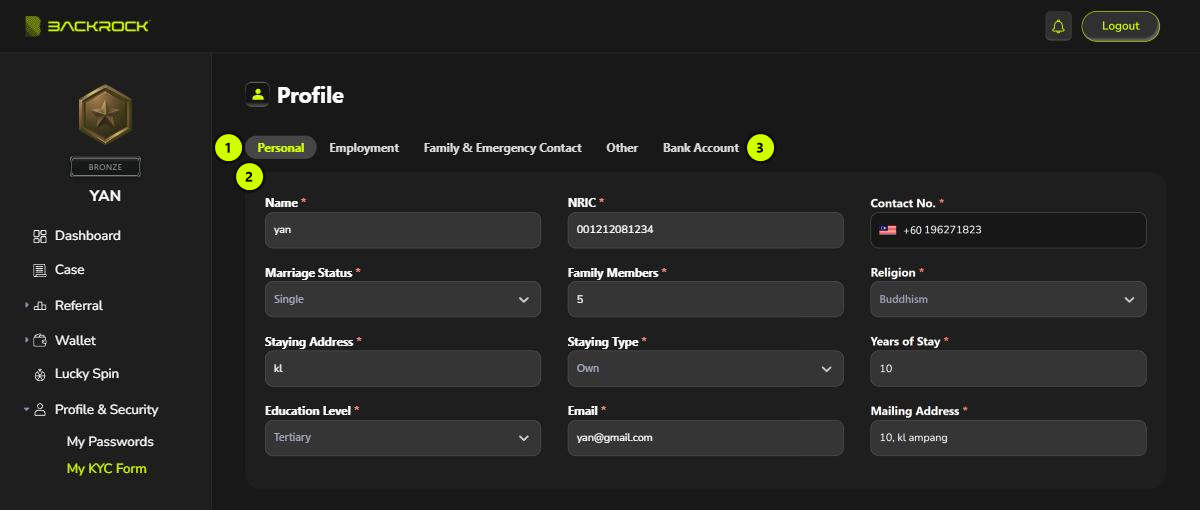
1. Tabs
Click a tab to see that part of your details:
| Tab | What it shows |
|---|---|
| Personal | Name, NRIC, contact number, marriage status, family members, religion, address, staying type, years of stay, education level, email and mailing address |
| Employment | Company, nature of business, job position, years of service, date of joining, salary and allowance, office details, employment status, EPF, income tax, EA documents and previous company |
| Family & Emergency Contact | Parent, spouse and emergency contact details |
| Other | Loan amount needed, certificates, tenancy agreement, bank history and bank accounts |
| Bank Account | Your bank, account number and account name |
2. Details
The details for the tab you selected. You can read them, but not change them here.
3. Bank Account
The bank account in this tab is the one used for your withdrawals. It is filled in automatically on the Withdraw page.