Referral Overview
The Referral Overview shows your current rank, your sales, how many people you have referred, and what you need to reach the next rank.
To open it: in the left menu, click Referral > Overview. You can also click View rank on the Dashboard.
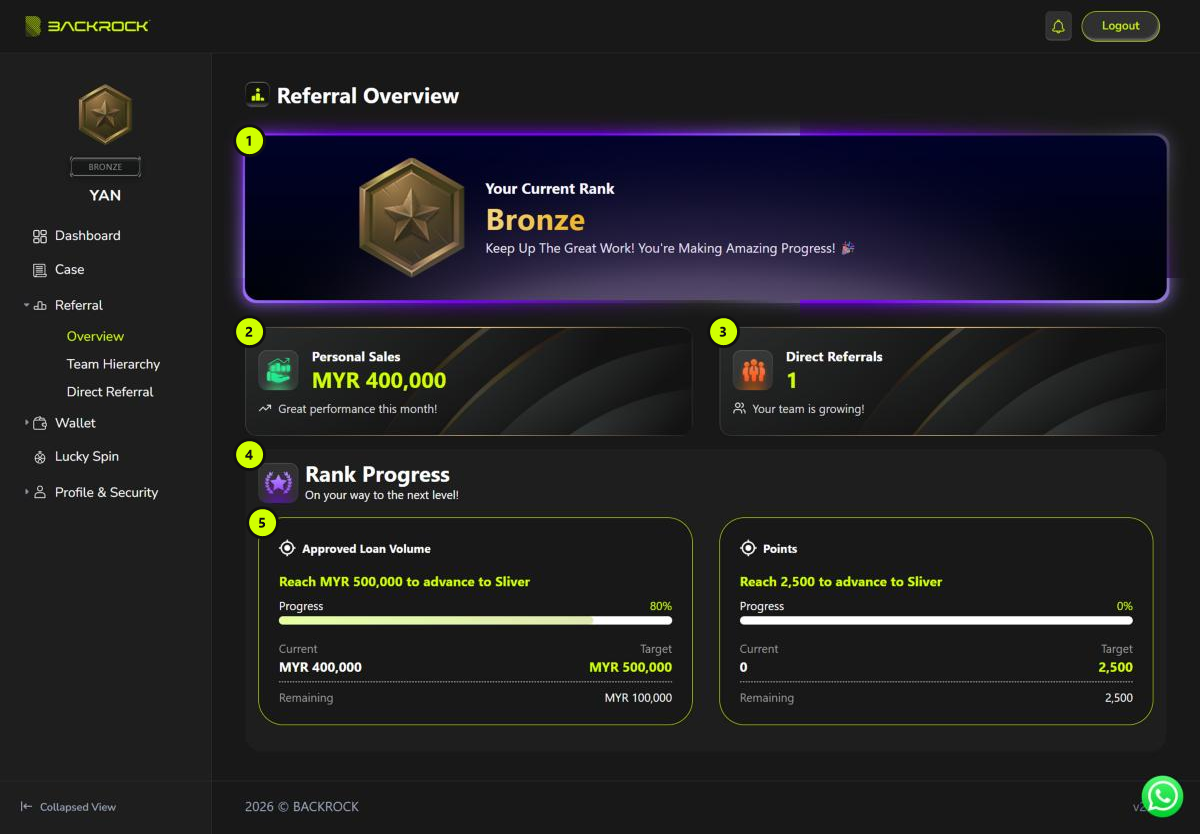
1. Your Current Rank
Your current rank and its medal. If you have not reached a rank yet, you see a dash (-).
2. Personal Sales
The total approved loan amount (MYR) of your own cases plus the cases of everyone in your referral network.
3. Direct Referrals
How many people have registered with your invitation.
4. Rank Progress
The targets for your next rank. If you are already at the highest rank, no targets are shown.
5. Target card
Each card is one target for the next rank, for example Approved Loan Volume or Points.
| Item | What it shows |
|---|---|
| Reach … to advance to … | The target and the rank it leads to |
| Progress | How far you are, in % |
| Current | Where you are now |
| Target | The amount you need to reach |
| Remaining | How much is left |
You don't need to apply for a rank. The system updates your rank automatically when you meet the requirements. It may take a little while to show.