Transaction History
The Transaction History shows every amount added to or taken from your wallets.
To open it: in the left menu, click Wallet > Transaction History. You can also click View Transaction on the Dashboard.
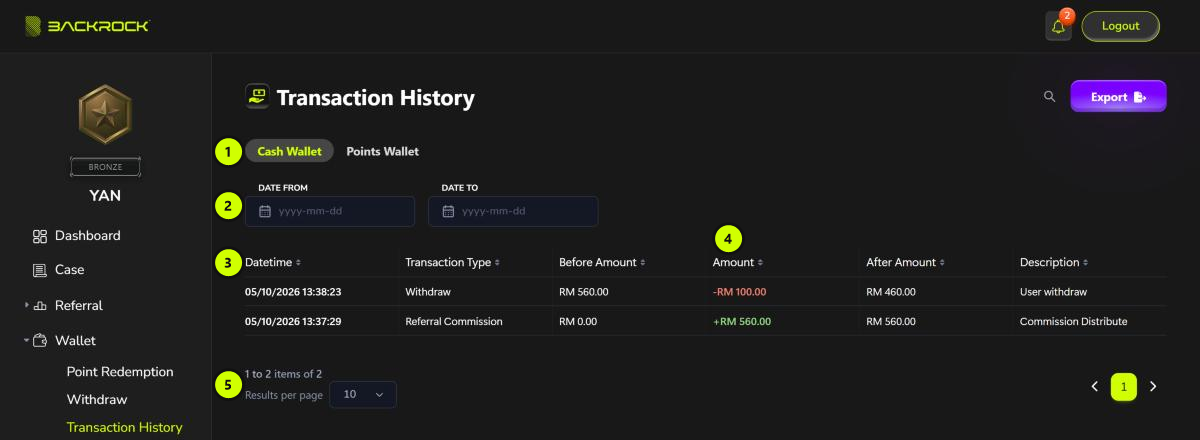
1. Wallet tabs
Click a wallet, for example Cash Wallet or Points Wallet, to see its transactions.
2. Date from / Date to
Pick a start date, an end date, or both, to show only the transactions in that period. Click Clear dates to show all transactions again.
3. Transaction list
The newest transactions are shown first.
| Column | What it shows |
|---|---|
| Datetime | When the transaction happened |
| Transaction Type | The kind of transaction, for example Withdraw or Referral Commission |
| Before Amount | The balance before the transaction |
| Amount | The change (see 4) |
| After Amount | The balance after the transaction |
| Description | More details about the transaction |
4. Amount
- + (green) is money added to the wallet, for example +RM 560.00 from a referral commission.
- - (red) is money taken from the wallet, for example -RM 100.00 for a withdrawal.
In the example above, the withdrawal took the balance from RM 560.00 (Before Amount) to RM 460.00 (After Amount).
5. Pages
Shows how many transactions there are. Use Results per page and the page buttons to move through a long list.