Withdraw
On the Withdraw page you can send money from your Cash Wallet to your bank account.
To open it: in the left menu, click Wallet > Withdraw.
- You need a trading password. Set it in My Passwords.
- Your bank details come from the Bank Account tab of My KYC Form. If they are missing, contact BackRock.
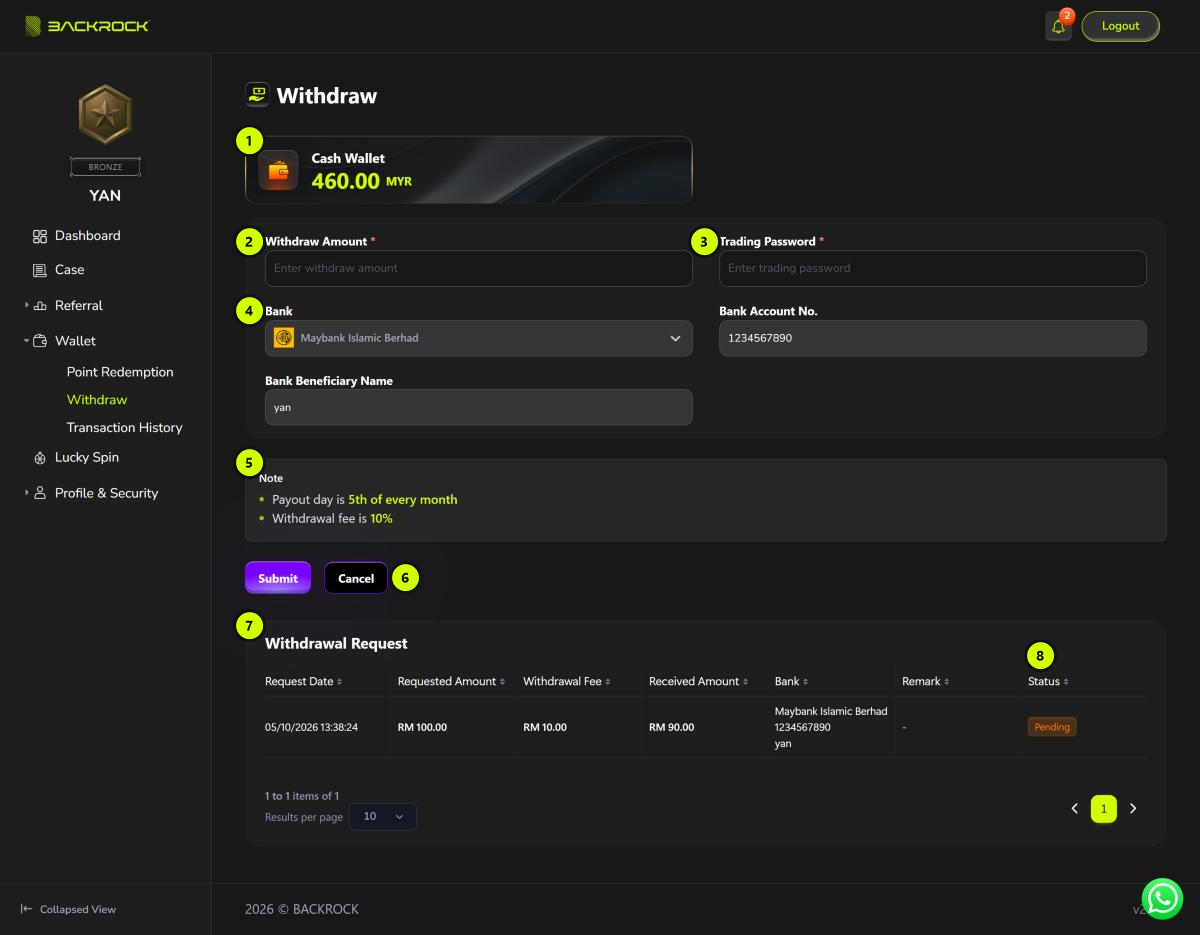
1. Cash Wallet
The amount you can withdraw. Only the Cash Wallet can be withdrawn.
2. Withdraw Amount
Enter how much you want to withdraw. It can't be more than your Cash Wallet balance.
3. Trading Password
Enter your trading password.
4. Bank details
Bank, Bank Account No. and Bank Beneficiary Name are filled in from your KYC form. You can't change them here. If they are wrong, contact BackRock.
5. Note
The rules for withdrawing, for example the payout day and the withdrawal fee. If there is a minimum amount, it is shown here too.
6. Submit / Cancel
Click Submit to send your request, or Cancel to clear the form.
After you submit, the amount is taken from your Cash Wallet straight away and the request appears in the list below with the status Pending.
7. Withdrawal Request
Your withdrawal requests:
| Column | What it shows |
|---|---|
| Request Date | When you made the request |
| Requested Amount | The total taken from your Cash Wallet |
| Withdrawal Fee | The fee for this withdrawal |
| Received Amount | The amount sent to your bank |
| Bank | The bank, account number and name |
| Remark | A note from BackRock, or the payment reference once paid |
For example, in the screenshot above a withdrawal of RM 100.00 with a 10% fee has a Withdrawal Fee of RM 10.00, so the Received Amount is RM 90.00.
8. Status
| Status | Meaning |
|---|---|
| Pending | Waiting for BackRock to review. |
| Approved | Approved. The money will be paid on the payout day. |
| Paid | The money has been sent to your bank. |
| Rejected | Not approved. The amount is returned to your Cash Wallet. |